Dealership Goals Panel
The Dealership Goals panel is used to define goals for the number of vehicles sold as a result of XtreamService leads. Additionally, this panel is used to define goals regarding the number of prospects to add or contact during a selected time period. The settings defined on this panel are used to determine the information that displays in the progress indicators in the Sales Goals panel and the Opportunity Goals panel on the Home screen.

|
The Dealership Goals panel displays on the General Settings screen. To access the General Settings screen, click the |
 (More) icon and then click the General Settings link in the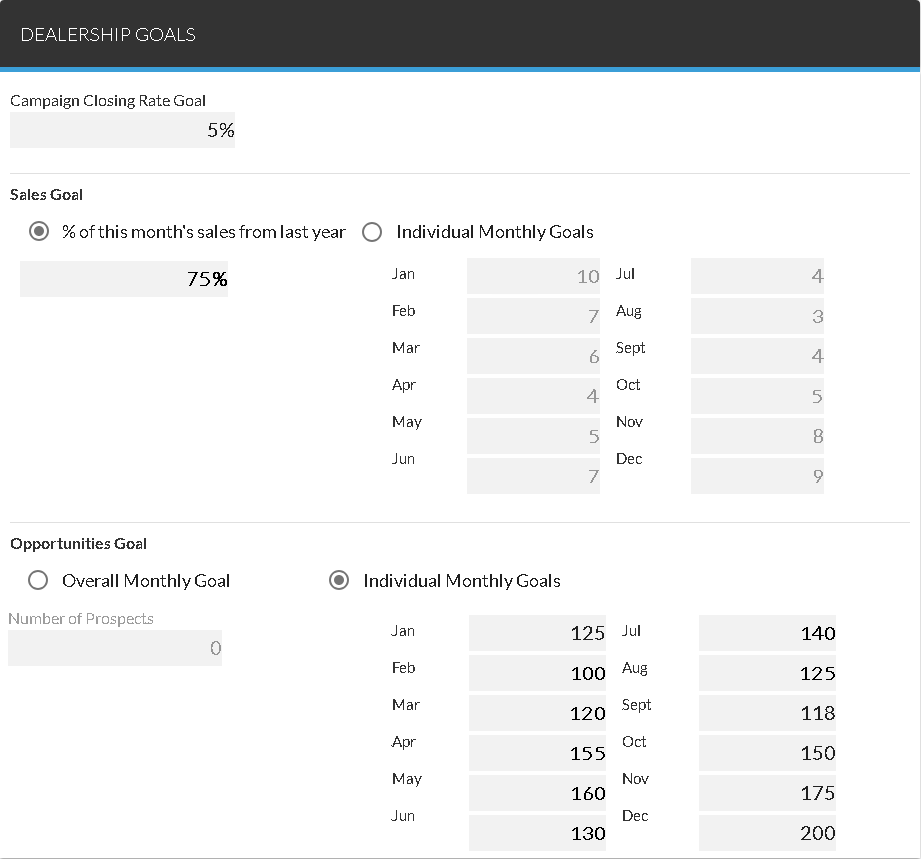
 Campaign Closing Rate Goal Section
The Campaign Closing Rate Goal section is used to define the goal for the percentage of XtreamService leads that result in vehicle sales for each sales campaign. Percentages on the Sales Campaigns tab of the Opportunities panel display as red or green based on the entry in this section. If a sales percentage is greater than the entry in this section, the percentage displays in green; otherwise the percentage displays in red.
Sales Goals Section
The Sales Goals section is used to define settings for the goals that display on the Sales Goals panel on the Home screen.
The following items are available in the Sales Goals section.
% of this month's sales from last year: Select this option button to define the monthly vehicle sales goal for vehicles sold to customers with XtreamService leads using a percentage of all sales from the same month of the previous year. For example, if 50 vehicles were sold to all customers in March of the previous year and 10% is entered in the field following this option button, the goal for sales to XtreamService lead customers for March of the current year would be set to 5. The defined goal displays in the progress indicator in the Sales Goals panel on the Home screen.
Individual Monthly Goals: Select this option button to define the vehicle sales goal for each month using the month fields. The defined goal displays in the progress indicator in the Sales Goals panel on the Home screen.
Month: Enter the sales goal for the corresponding month in each month field. These fields are only available when the Individual Monthly Goals option button is selected.
Opportunity Goals Section
The Opportunity Goals section is used to define settings for the goals that display on the Opportunity Goals panel on the Home screen.
The following items are available in the Opportunity Goals section.
Overall Monthly Goal: Select this option to define the goal for the number of prospects to contact each month using the entry in the Number of Prospects field. The defined goal displays in the progress indicator in the Opportunity Goals panel on the Home screen.
Number of Prospects: Enter the goal for the number of prospects to contact each month.
Note - This field is available only when the Overall Monthly Goal option button is selected.
Individual Monthly Goals: Select this option button to define the goal for the number of prospects to contact each month using the month fields. The defined goal displays in the progress indicator in the Opportunity Goals panel on the Home screen.
Month: Enter the sales goal for the corresponding month in each month field. These fields are only available when the Individual Monthly Goals option button is selected.
Click here for a list of products that may be mentioned in this help file.